
Radiology Innovations
Radiology operations at home
Radiology as a practice has historically relied on the presence of radiologists and radiology techs in person, on location. With the advent of the Radiology Operations Command Center, radiologists and experts were able to control, manage and assist with scanning from remote locations.
Team and role
UX Designer and Researcher
2023-2024
Philips Cardiovascular Informatics team
Key qualitiative insights for application of the ROCC tool outside of workspace
Outcomes
Facilitated FDA 510(k) process, resulting in 100% regulatory compliance and safety adherence.

Context
What is the problem?
Customers are restricted to in-person work because of current hardware requirements
Enterprises are having issues with retention and recruitment without WFH options
Comfortability, connectivity and concerns of safety create barriers to use outside of the office
How can we help?
Can we utilize our existing products and platforms while altering them to fit into remote work interfaces such as laptops or single screen devices?
Goals
Define and outline the use cases for operation of ROCC outside of the command center
Facilitate operation of single sessions from a laptop screen with future scalability
Create a cohesive experience in and out of the command center
Radiology Operations Command Center Current state

The radiology command center is a solution that allows user within a hospital or command center setting to review, control, edit, and assist in scans. The set up is 3-5 screens, depending on the user, to accommodate the needs of multiple scans
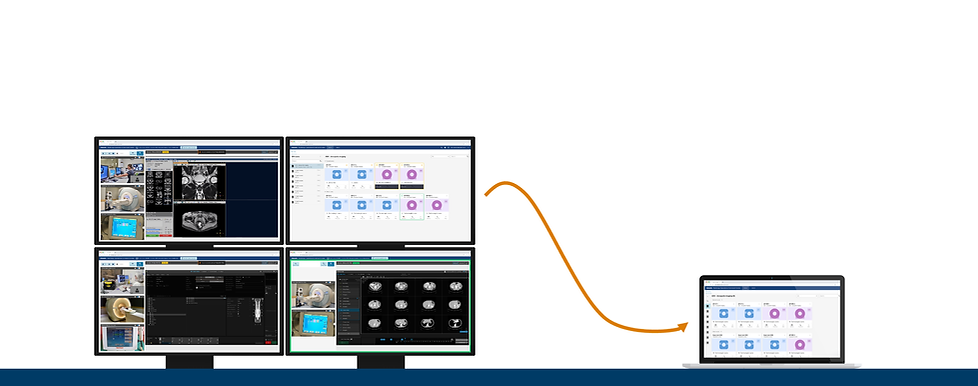
Radiology operations from home
The reduction of the four screens down to one large laptop or desktop screen helps facilitate the option for working outside of the office or command center
In order to facilitate this change, we we would need to enhance the security features, restrict the number of editing sessions available and enhance the capabilities of the web-based tool
Key use cases
Current
Emergent

Not scheduled
Complex case or less experienced tech requesting assistance
20-60 min call
Whatever tech is available
Coverage

Not scheduled
Coverage for expert users who are unavailable or have left
2-8 hour shifts as needed
Opportunities
Scheduled

Planned, scheduled
Alongside command center shifts
Allow for flexibility of use
8-12 hour shift, single session

Contracted
Scheduled
Alleviate current staffing shortages
8 hour shifts, single session, as needed
Work from home Current state
Current ROCC software

-
Single screen, laptop
-
Currently used in a single session
-
As needed or full session use
-
Generally utilized when ROCC command center is not available
-
Locations: Home, on site (“on the floor”)
Protocol manager

-
Single screen, laptop
-
Currently used in a single session
-
As needed
-
Quickest access to console screen, used when other tools will take too long
-
Locations: Home, on site (“on the floor”)
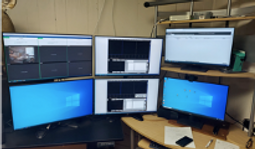
Full home command center
-
Multi-screen, desktop
-
Multi-session
-
Full shift coverage
-
Used as a replacement for a full-time tech
-
Locations: Home, on site (“on the floor”)
Wireframing
We utilized these high level design provocations in order to understand what aspects of the interface work best in the context.
Concept 1
Key Questions:
Do you feel comfortable without having a ”home base” for switching calls?
Do you feel comfortable having any part of the console covered when switching calls?
Pros
-
No tab management
-
Reduces confusion when switching or ending a call
Cons
-
Pop up blocks current room view
-
Harder to scale
-
Less familiar
Concept 2
Most preffered option by interviewees
Key Questions:
Do you feel comfortable switching between tabs in order to switch calls?
Is the number of tabs confusing or concerning?
Does this fit into the current use of other applications?
Pros
-
Familiarity
-
Separate pages for calls and console; similar to current ROCC
-
Simple and scalable
Cons
-
Reliant on browser tab settings
-
High levels of tab management alongside other required applications
Concept 3
Key Questions:
What is the range of familiarity and comfortability with change?
Are there times when switching during a call is necessary?
What is needed for multiple scans?
Pros
-
Never have to leave or hide the console to switch rooms
-
Allows for greater room management without extra tabs
Cons
-
Lack of familiarity
-
Departure from current design standards
Design prototype

Overall Value
Flexibility
-
There is active interest from staff in having options for working outside of the office
-
ROCC is already being used outside of the command center in emergent situations
Accessibility
-
Design ROCC to be used on a laptop computer increases the available numbers of expert users that could use it
-
Can assist with staffing shortages
Cost
-
Relying on the software-based solution on smaller technological footprints can reduce cost
Shift management
-
Providing access for expert users over a laptop can allow for flexibility in shifts, schedules, or possible contractors to increase coverage